
Springer Nature is committed to providing authors with clear and accessible information about their book’s visibility and impact. This page explains how you can find performance data for your book.
Overview
Springer Nature previously provided an annual eBook Performance Report. This report was discontinued in 2020 and is no longer available in its original form. However authors continue to have access to key performance metrics online, and more detailed insights can be requested through our customer support team.
Where to Find Basic Performance Metrics
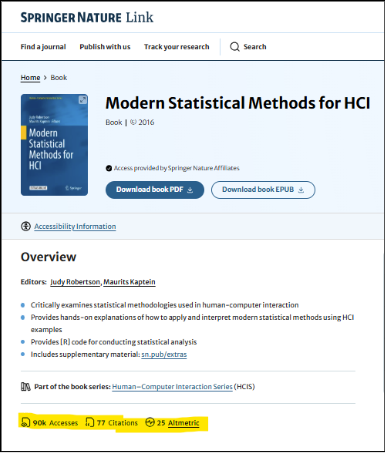
You can access essential performance metrics directly on your book’s Springer Nature Book Page. These include:
- Accesses
- Citations
- Altmetric
These metrics are available for all published books and update automatically as new data becomes available via Home | Springer Nature Link.
The screenshot below show an example of where to find this data:
Requesting a Custom Report
If you require more insight into your Book’s performance, you may request a custom report. These reports are prepared manually and it includes:
- Yearly Trends
- Monthly Trends
- Books by chapter
- Usage by Country
- Region - Books by title
To request this report, please use our Book Authors Support form.